Launchpad
Launchpad is a 28-day foundation challenge that builds the core habits and routine every trader needs. It gives you your own hub inside the MATE Portal and a dashboard anchored to your challenge start date, so each day you know exactly what to watch, do, and reflect on. Instead of a shelf of videos to binge, Launchpad hands you one clear step at a time for four weeks.
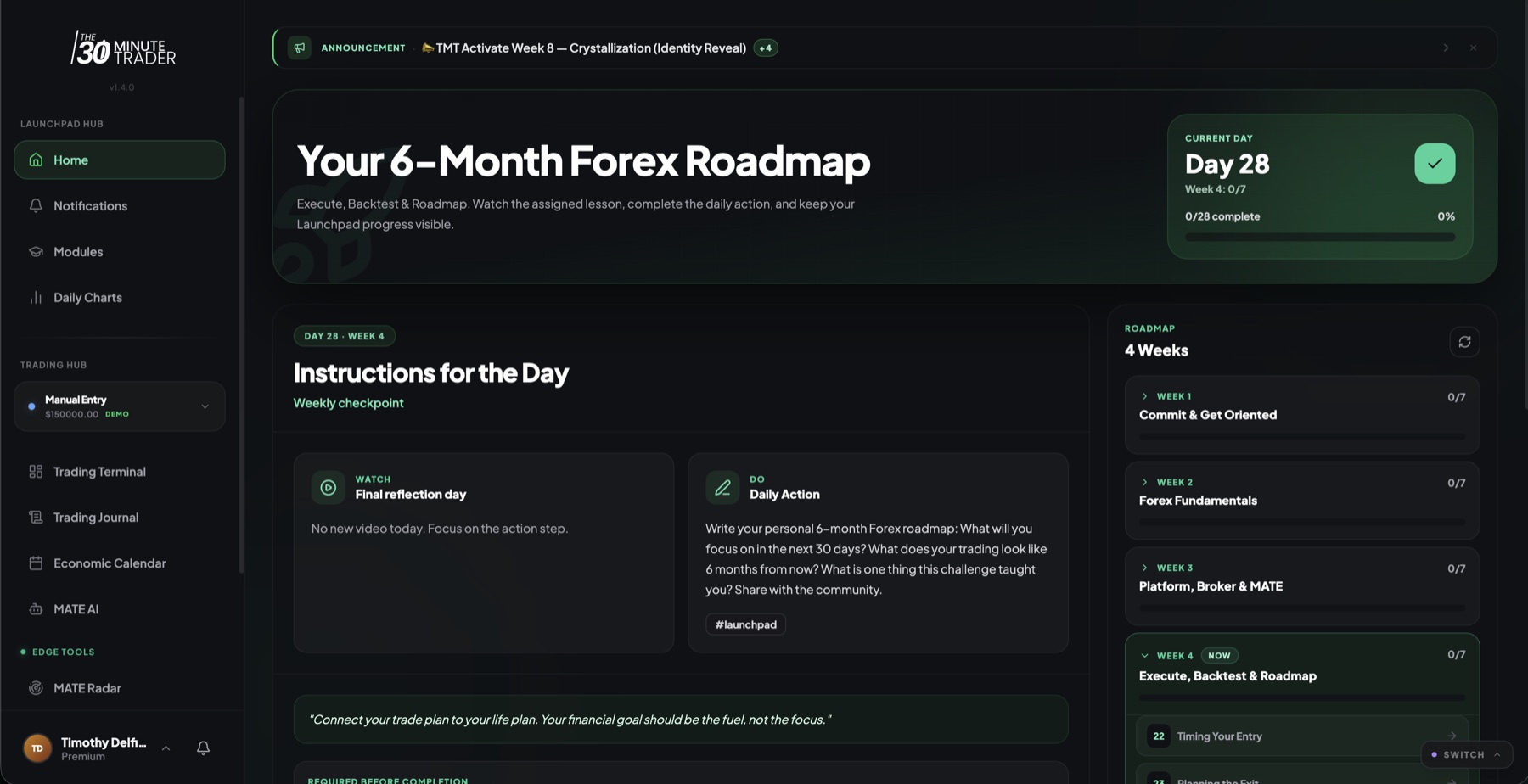
Getting oriented: the Launchpad hub
Everything in Launchpad lives in one sidebar so you never lose your place:
- Home, Notifications, Modules, Daily Charts — your daily dashboard, alerts, the lesson library, and the coach's daily chart feed.
- Trading Hub — an account switcher plus the Trading Terminal, Trading Journal, Economic Calendar, and MATE AI.
- Edge Tools — MATE Radar, Daily Game Plan, and Playbooks. These appear when your tier includes them, so you may not see this section on Launchpad alone.
When you first join, there's a one-time onboarding call to get you set up, and a community (Facebook) group where you post along the way.
Home: your 28-day dashboard
Home is where you spend most of your time. It shows a current-day counter (Day 1 through 28), calculated from your challenge start date, so the challenge meets you wherever you are rather than making you hunt for the right lesson.
Below that is a four-week roadmap with daily progress, and each day's action cards:
- A lesson to watch — the concept for the day.
- A daily action to do — put the concept into practice.
- A reflection / accountability step — lock in what you learned.
The four weeks build on each other:
- Week 1 — Commit & Get Oriented
- Week 2 — Forex Fundamentals
- Week 3 — Platform, Broker & MATE
- Week 4 — Execute, Backtest & Roadmap
Days 7, 14, 21, and 28 are weekly checkpoints. Each one asks for a reflection and an accountability post so the habit sticks before you move on.
Modules and Daily Charts
Modules holds the full Launchpad curriculum as video lessons — the same lessons the daily cards point you to, available any time you want to review or move ahead. Daily Charts is the coach's daily chart and market feed, so you're reading real setups alongside the fundamentals you're learning.
Journaling and market context
Trading Journal lets you log your trades manually so you can see your decisions and patterns over time. The Economic Calendar shows the shared market events that move price — check it before you plan a session. See the Economic Calendar for how to read it.
Your P&L Dashboard / Trading Terminal brings your account performance into one view so your practice and your results sit side by side.
Your trading accounts
Launchpad lets you manage your trading accounts and open a focused account detail view for any one of them. Launchpad allows more accounts than Starter, so you have room to keep a practice account and a live account organized separately. For how accounts connect, sync, and how the account detail view works, see Trading Accounts & Sync.
MATE AI on Launchpad
Launchpad includes MATE AI on the Basic tier — more capable than Starter, with trade-aware context, so it can reason about what you've actually done rather than answering in the abstract. See MATE AI for what each tier can do.
Access and what happens after
The challenge runs for 28 days from your start date. When your Launchpad access ends, your history and completed lessons stay with you — nothing is erased. Your portal benefits return to Starter unless another paid program is active on your account.
For the full picture of how programs start, overlap, and hand off, see Your Programs.