Starter
Starter is the free way into the MATE Portal. It gives you a home base, a taste of the library, and your first trading accounts. When you create a new account, you land here automatically — there's nothing to buy and nothing to set up first. It's built to get you watching lessons, opening your first account, and logging trades on day one.
Finding your way around
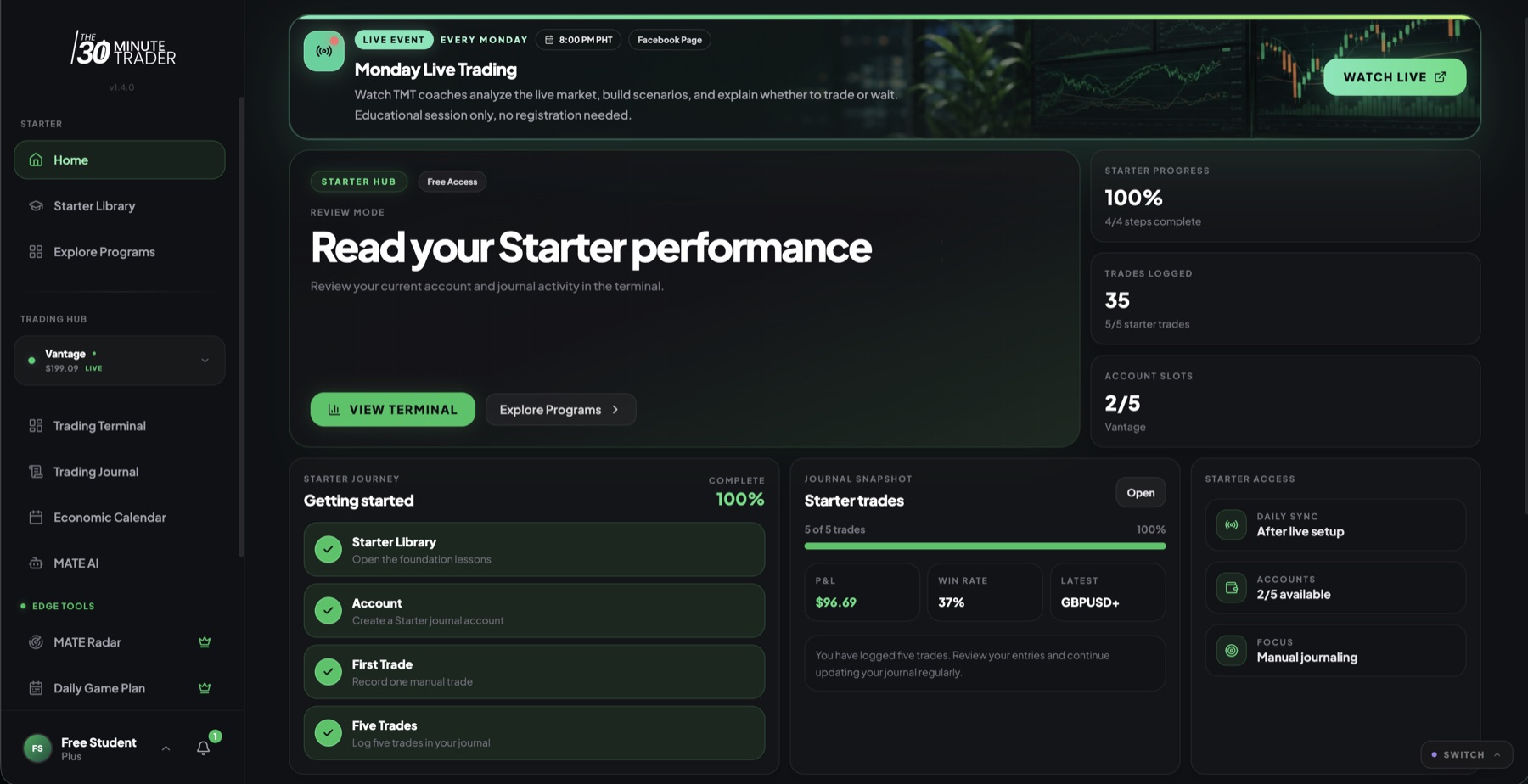
The sidebar is your map. On Starter you'll see:
- Home — your getting-started roadmap and a snapshot of your trading.
- Starter Library — the foundation video lessons, organized into modules.
- Explore Programs — compare the paid programs and decide where to go next.
- Trading Hub — an account switcher plus the Trading Terminal, Trading Journal, Economic Calendar, and MATE AI.
- Edge Tools — MATE Radar, the Daily Game Plan, and Playbooks. These appear locked on Starter as a preview of what the paid tiers unlock.
- Notifications — updates and alerts tied to your account.
The locked Edge Tools aren't broken — they're a preview. They light up when you move to a paid program. See Explore Programs.
Your first sign-in: onboarding
The first time you arrive, Starter asks you a short, one-time set of questions so the portal can point you in the right direction. It covers where you are in your trading journey, your main goal, your biggest struggle, your experience level, the kind of account you trade, and how you heard about TMT. It takes a minute, you only do it once, and then you're dropped straight onto your Home screen.
The Home screen
Home is where you start each day. It brings together:
- A getting-started roadmap — the path to follow: watch the library, create an account, log your trades, then review them.
- Your daily sync schedule — when your live-sync account refreshes.
- Your account slots — the accounts you have and room to add one.
- A snapshot of your trades — your P&L and win rate at a glance.
- A link to the onboarding call — book time to get set up properly.
The Starter Library
The Starter Library is the foundation course. It's organized into modules, each holding a series of video lessons that walk you through the basics of trading the TMT way. Work through them in order — the roadmap on your Home screen starts here for a reason. This is the taste of the full library that the paid programs expand on.
Your trading accounts
Starter gives you real accounts to trade and track, not just a demo:
- A manual account — for logging trades by hand in the Trading Journal.
- A live-sync account — connect a MetaTrader account and let the portal pull your trades in automatically.
Both feed the Trading Terminal, which gives you a performance snapshot — P&L and key stats for the account you're viewing. The AI Insights panel inside the Terminal is a paid upgrade.
Account limits and the details of connecting a live-sync account are covered on the Trading Accounts & Sync page, so you always see the current setup. Starter accounts refresh automatically once a day at an off-peak time — the on-demand Sync Now button is a paid feature.
Logging and reviewing trades
Use the Trading Journal to log trades manually and keep a record you can review. Pair it with the Economic Calendar — a shared calendar of market events — so you can see what was moving the market when you took a trade. See the Economic Calendar for more.
MATE AI on Starter
Starter includes access to MATE AI with a weekly chat limit — a handful of prompts that reset on a rolling weekly basis, with minimal context. From time to time you may get bonus prompts through promotions. It's enough to try it out and see how it fits your workflow. For what each tier includes and the current details, see MATE AI.
When you join a paid program, the Starter limits lift and the locked tools open up. If paid access ends, you simply return to Starter — nothing is lost. See Your Programs.