Trading Journal
Your trading journal is where every trade lives. It is a running list of the trades you have taken, each with its direction, outcome, the setup you were trading, how you felt, and the chart you were looking at. Some trades you add by hand; others arrive automatically from a connected MetaTrader account. Either way, the journal is the record you come back to when you want to see what is working, what keeps costing you, and whether you are actually following your own rules.
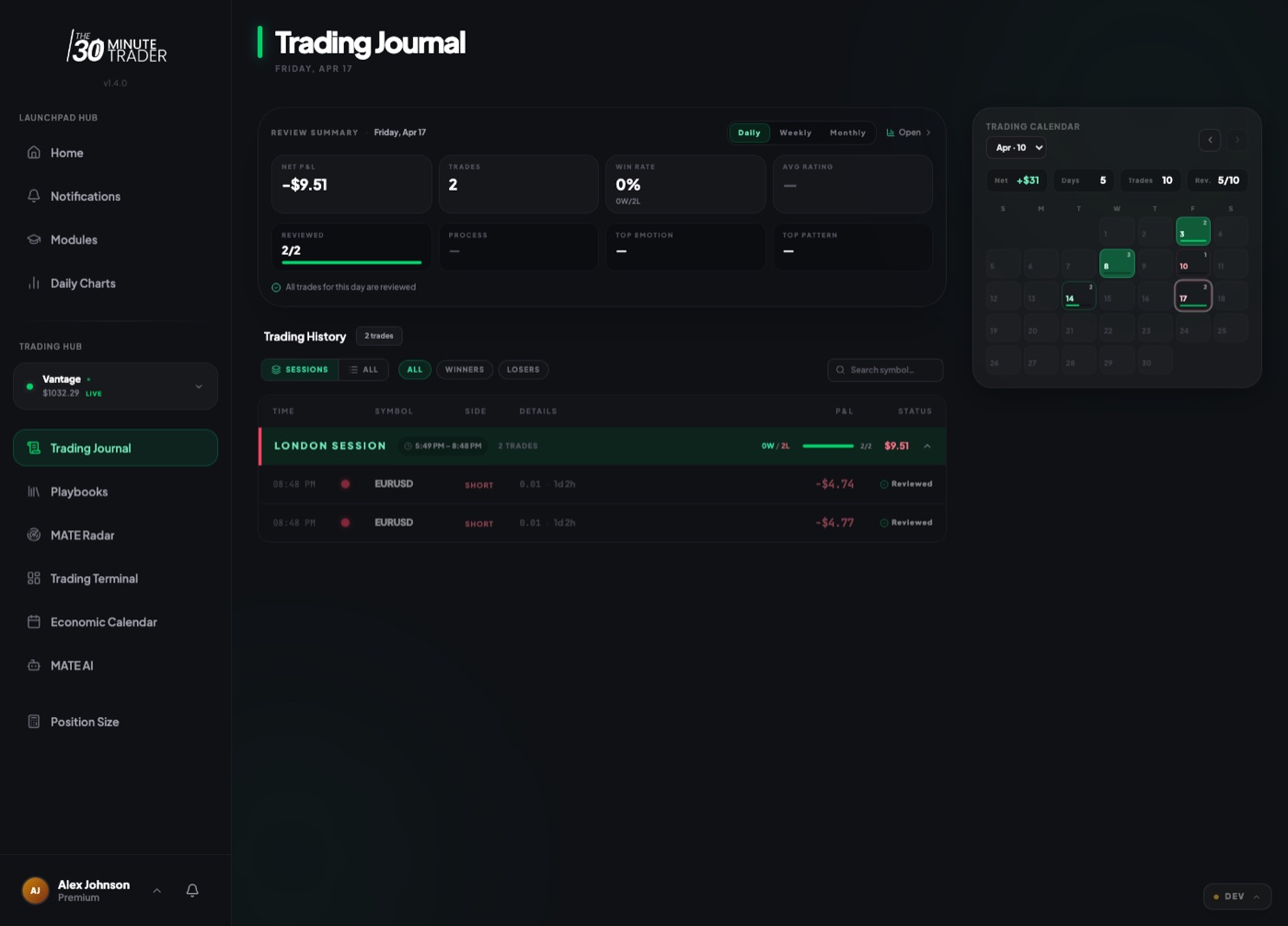
Logging a trade manually
To add a trade yourself, open the journal and choose to add a new entry. The entry form walks you through it in a few parts:
- The trade — symbol, whether you went long or short, whether it is still open or already closed, your profit or loss, the amount you risked, and the dates the trade was opened and closed.
- Your mindset — how you felt while trading: Calm, Greedy, Anxious, or Angry. Over time this is one of the most revealing columns in your journal.
- Notes — a free-text space to write what you saw and why you took the trade. On the Edge and Coach tiers of MATE AI you can dictate these notes by voice instead of typing.
Once you save, the trade appears in your list immediately.
On the Starter program you get a manual journal with limits on how many trading accounts you can keep. See Starter for the current specifics rather than relying on a number here, since these limits can change.
Trades imported from a synced account
If you connect a MetaTrader account, you do not have to type those trades in. The portal syncs your closed trades from the broker and adds them to the journal for you, so your list stays complete without manual entry. Imported trades carry the real numbers straight from your account — symbol, direction, size, and result — and you can still open each one to add your mindset, notes, tags, and chart evidence.
How often the sync runs depends on your program. On the Starter program a synced account is refreshed automatically once a day during off-peak hours rather than on demand; the "Sync Now" button is locked. See Accounts & Sync for how connecting and syncing accounts works, and Starter for the account limits that apply to you.
Tagging setups and linking to a Playbook
Each entry lets you tag what actually happened in the trade with quick reflection tags such as Confidently followed my Plan, Entered too Early, Closed too Early, or Moved my SL and TP. These tags turn vague feelings about a trade into something you can filter and count later.
You can also link a trade to one of your Playbooks — the written setup you intended to trade. When you link a trade, you record whether you followed the playbook, only partially followed it, or did not follow it, along with the reason you deviated (entered late, ignored your invalidation, moved your stop, took an emotional trade, and so on). This is how you find out whether your edge is failing or whether you are simply not trading your own plan.
The reflection tags and playbook adherence are only useful if they are honest. A run of "Entered too Early" tags is not a bad journal — it is the journal doing its job and showing you exactly what to fix.
Attaching chart evidence
Every entry can hold chart evidence so the picture lives with the trade. You can attach it two ways:
- Upload a screenshot of your chart, or drag and drop an image into the entry.
- Paste a chart link (for example a TradingView link) and the portal will show a preview alongside the trade.
Once attached, you can expand the chart to full size from the entry. Reviewing your charts side by side with your notes weeks later is far more useful than the numbers alone.
Reviewing your trades and outcomes
The journal is built for review, not just record-keeping. You can:
- Search and filter your trades, and narrow to a date range.
- Sort by date or by profit and loss.
- Switch views between a card layout and a split layout, and tighten or loosen the density of the list.
- Filter by status — see everything, only trades you have shared for review, or only trades that have been reviewed.
Open any trade to see its full detail: the numbers, your mindset, your tags, your notes, the chart, and the linked playbook all in one place. This is where patterns surface — which setups pay, which moods cost you, and where your discipline slips.
Coach feedback on your trades
You can mark a trade as shared with your coach. When you do, your coach can view the trade and leave written feedback directly on it, which then appears on the entry. Reviewed trades are flagged in your list so they are easy to find, and you can write your own reflection underneath the feedback — what you learned and what you will change next time.
Written coach feedback on individual trades is part of the Premium experience. Premium is temporarily available in its own portal. The journal, manual logging, tags, playbook links, and chart evidence described above are available without it.