MATE AI
MATE AI is your in-portal trading coach. It answers questions, works from your real trading context, and helps you think through your trading day — covering trade reviews, journaling, mindset, the MATE framework, and how the platform works. What it can see and do scales up with your program and tier, but one rule never changes: it coaches you with context, it does not give you signals.
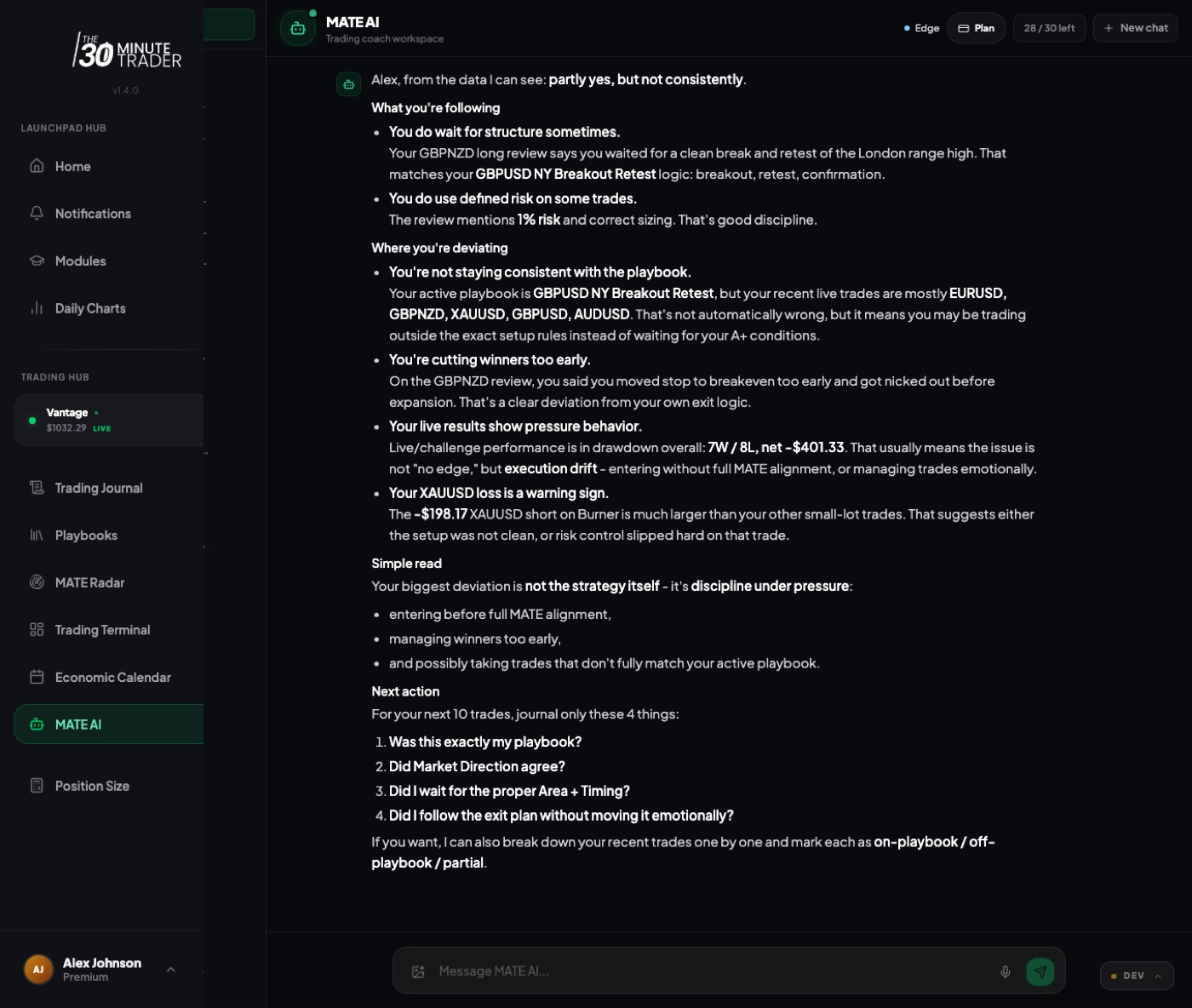
What MATE AI can — and can't — help with
MATE AI is built for trading education and reflection, not market calls. It's good at:
- Reviewing your recent trades and helping you spot patterns
- Working through your trading journal and improving your notes
- Talking through mindset, discipline, and process
- Explaining the MATE framework and how to apply it
- Answering questions about the platform and the program
What it will not do:
- Give live trading signals or specific buy/sell instructions
- Set entry, stop-loss, or take-profit levels for you
- Provide financial advice or tell you what to trade
If you ask for something it can't do, it will still help where it can — for example, by walking you through how to think about a setup yourself rather than calling it for you.
Access by program and tier
MATE AI access is tied to your MATE Portal tier. There are exactly four tiers:
- Starter — the free tier, with capped weekly access
- Basic — full chat with trade-aware context
- Edge — adds daily-loop coaching features
- Coach — the fullest experience, with long-term memory
Higher tiers come with the more capable programs, so the program you're enrolled in generally determines your tier. Launchpad and Activate enrollments include Basic; Premium includes Coach. When a program's access period ends, MATE AI returns to Starter unless you have another active paid tier.
You don't pick a MATE AI tier directly — it follows the program you're in. See Your Programs to understand which program you have and what it includes. (Premium is temporarily available in its own portal.)
What MATE AI can see, by tier
MATE AI's coaching gets sharper the more context it can draw on, and that context scales with your tier. Higher tiers let MATE AI reason about your actual account and trading history instead of answering in general terms.
This is why the same question can get a more tailored answer on a higher tier: with more context, MATE AI can ground its coaching in your real numbers rather than generalities.
Starter weekly limit and bonus prompts
On the Starter tier, MATE AI is capped to a set number of prompts on a rolling 7-day basis (currently 5). Your remaining prompts are shown at the top of the workspace, and the window refills as your oldest prompts age past the 7-day mark — so you don't have to wait for a fixed weekly reset date.
From time to time, a marketing campaign (such as a webinar) may grant Starter users a batch of bonus prompts. When you have an active bonus, those prompts are used first and your normal weekly allowance stays untouched underneath. Bonus prompts are promotional only — they're not account credit or stored value — and unused ones expire when the campaign ends, after which you're back to the normal Starter allowance.
If you regularly hit the Starter cap, moving up to Basic removes the weekly limit and lets MATE AI coach from your recent trades. See Your Programs.
Conversations and chat history
Your chats are saved as conversations, listed in the left-hand rail of the workspace. You can:
- Start a new conversation at any time
- Reopen a past conversation to pick up where you left off
- Delete a conversation you no longer need
Keeping related questions in one conversation gives MATE AI more to work with — it can follow the thread of what you've already discussed rather than starting cold each time.
Uploading images for review
You can attach images to a message — most usefully chart screenshots — and ask MATE AI to look at them as part of its coaching. Use the attach button in the message box to add up to three images (PNG, JPEG, or WebP) per message.
This is a great way to talk through a setup after the fact: share the chart, describe what you were thinking, and let MATE AI help you reflect on the read. As always, it reviews and coaches — it won't turn your screenshot into a buy or sell call.
Safety: context, not a signal
MATE AI is deliberately built so it can't be turned into a trade-calling tool. It won't give live signals, exact entries, stop-losses, take-profits, or financial advice — no matter how the question is phrased. This is a feature, not a limitation: the goal is to make you a better, more independent trader, not to have you follow instructions you don't understand.
When you ask for a market call, MATE AI redirects to the part it can actually help with — your process, your plan, your review — so you build the judgment to make the decision yourself.
Nothing MATE AI says is financial advice or a recommendation to buy or sell. Treat its input as coaching on your process and decisions you own.