Playbooks
A Playbook is a written, repeatable definition of one of your trading setups — the exact conditions that have to be true for you to take it, where you enter, what confirms the trade, and where you get out. Instead of carrying your rules in your head, you write them down once so you can follow them the same way every time, and so you can check whether you actually did.
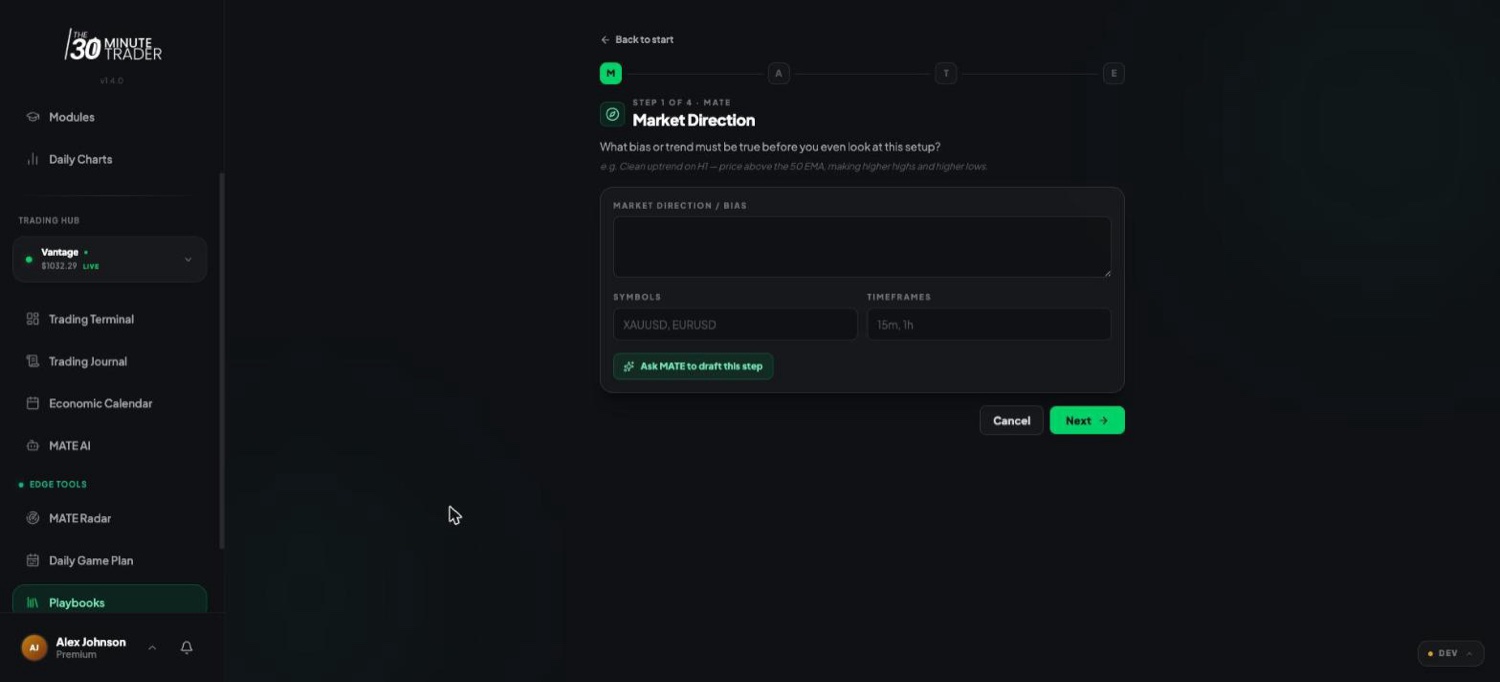
Each playbook is built around the MATE framework: Market Direction, Area, Timing, and Exit. The builder walks you through those four steps in order, then finishes with your risk rules and a name. You can fill each step in yourself, or ask MATE to draft it for you and refine from there.
The MATE framework
Every playbook is structured the same way, so any setup you write reads in the same order and nothing important gets skipped. The four steps run across the top of the builder as M → A → T → E:
After the four MATE steps, a final step collects your risk rules — risk per trade, minimum reward-to-risk, max trades per day, an optional checklist, and the name you'll give the playbook.
M — Market Direction
The starting condition. This is the bias or trend that has to be in place before the setup is even on the table. In the builder you describe the direction, then add the Symbols the playbook applies to and the Timeframes you read it on. If the market doesn't match this step, the rest of the playbook doesn't apply.
A — Area
Where you actually act — your area of alignment, the level or zone where your bias and the structure line up. This is the place a trade becomes possible, not the moment you click buy or sell.
T — Timing
What turns a possible trade into a real one: the confirmation or trigger you wait for, the session you trade it in, and — just as important — the conditions where you stand down and take nothing. Writing your no-trade conditions here is what keeps a good setup from turning into a bad habit.
E — Exit
Where the trade is decided. The invalidation point tells you where you were wrong and the trade is over; the exit rules tell you where you take profit. Defining both up front means the decision is already made before you're in the trade and tempted to move it.
Creating and editing a playbook
When you create a new playbook, the builder opens on a short kickoff step where you can either describe your setup in a sentence or two and let MATE draft the whole thing, or start from scratch and fill in each step yourself. From there you move through M, A, T, and E one step at a time, then set your risk rules and name it.
To edit a playbook later, open it and step back through the same MATE flow — your existing rules are pre-filled, so you only change what's changed. You can also give each playbook a colour and tags to keep your library organised, and duplicate one as a starting point for a related setup.
There's no single "right" amount of detail. A good playbook is specific enough that someone else could read it and recognise your setup — and specific enough that you can honestly say afterwards whether you followed it.
Ask MATE to draft this step
You don't have to write a playbook from a blank page. On each MATE step there's an Ask MATE to draft this step button that uses MATE AI to fill in that section for you, based on what it already knows about your setup. On the kickoff step, Build with MATE takes a one- or two-sentence description and drafts the whole playbook into the MATE framework at once.
Either way, MATE writes a first draft and you refine it — the wording stays yours to edit on every field. This is the same MATE AI that coaches you elsewhere in the portal; see MATE AI for what it can see and how it helps.
Connecting playbooks to your journal
Playbooks are most useful once you start matching your trades against them. From a trade in your journal, you can link it to a playbook and record how closely you followed your own rules:
- Adherence — mark the trade Followed, Partial, Not followed, or N/A.
- Deviation reasons — when you didn't follow the plan, tag why (for example: entered late, traded outside your session, ignored invalidation, risk too high, moved your stop).
- Score adherence with MATE — let MATE compare the trade against the playbook's rules and suggest an adherence rating and a short rationale, which you can keep or adjust.
Over time this builds a picture of how disciplined you actually are with each setup — separate from whether the trade won or lost. The point isn't to win every trade; it's to follow your own rules and see which setups are worth keeping.
Availability by program and tier
Playbooks are an Edge-tier tool. Access to the trading tools — and how many playbooks you can keep — scales with your program and MATE AI tier (Starter, Basic, Edge, and Coach). If playbooks are locked for you, the portal points you to Edge.
To see what's included with your plan, check Your Programs and the tier breakdown on the MATE AI page rather than assuming a specific limit.